
Download Custom CSS/JS Extension – Browser Extensions, Web Development, Custom Styling
Overview
The Custom CSS/JS Extension is a powerful browser tool designed for developers and web enthusiasts who require granular control over website styling and behavior. It enables users to inject custom CSS and JavaScript code on a per-domain basis, offering a flexible solution for personalizing web experiences or testing development changes. The software is particularly useful for front-end developers, designers, and power users who need to modify website layouts, fix visual issues, or automate interactions without altering the original source code.
By allowing users to store settings locally or sync them via Google Drive, the extension provides both privacy-focused and cloud-connected workflows. This dual storage model supports seamless transitions between devices, making it ideal for users who work across multiple machines. Real-world applications include debugging responsive layouts, applying dark mode overrides, or enhancing accessibility features on poorly designed sites. The tool also serves as a lightweight alternative to full-fledged development environments for quick testing and prototyping.
While the developer’s background is not publicly detailed, the extension’s consistent update history suggests active maintenance and a focus on reliability. The software supports major operating systems including Windows, Mac, and Linux, ensuring broad accessibility. With features like JSON export/import, UUID-based syncing, and a streamlined UI, it caters to both technical users and those seeking a simple yet robust customization platform.
Key Features & Capabilities
- Per-Domain Custom CSS and JS Injection – Apply custom styles and scripts to specific websites, enabling targeted modifications without affecting other domains.
- Local or Google Drive Storage – Choose to store settings locally for privacy or sync them online for cross-device access.
- JSON Export and Import with UUIDs – Safely back up configurations or transfer them between computers using standardized JSON files with unique identifiers.
- Live CSS Propagation – Updated styles are applied instantly after saving, eliminating the need for manual page refreshes.
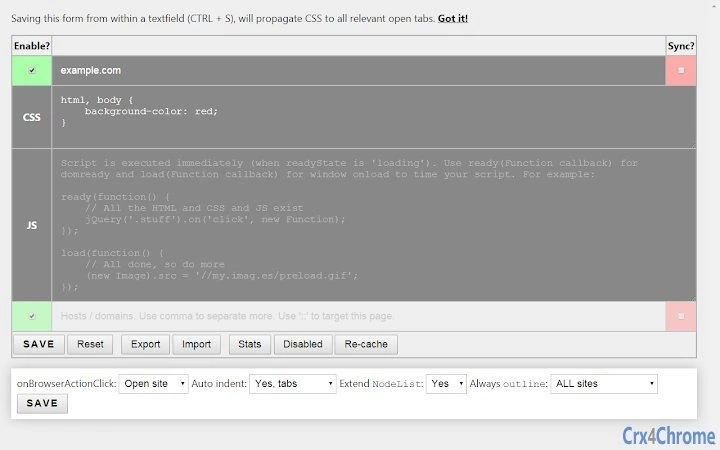
- Simple, Keyboard-Driven UI – Save changes with Ctrl+S or Enter; access the options page via a browser action button for quick navigation.
- Wildcard Domain Support – Use patterns like
*.wikia.comormy.*.comto apply rules to multiple subdomains efficiently. - Site Sorting and Management – Organize domains with improved sorting functionality and easy deletion across devices.
- Code Search and Inline Stats – Locate specific rules within your configuration and view usage statistics directly in the interface.
- Automatic Sync with Google Drive – Enable automatic cloud backup and real-time updates across devices.
- Context Menu Integration – Access options and disable sites directly from the browser action button’s context menu.
These capabilities empower users to create highly personalized browsing experiences. For example, a developer can apply a consistent dark theme across all wikia sites using a wildcard rule, while a designer might inject custom JavaScript to test interactive elements on a staging site. The extension also supports backup and recovery workflows, ensuring that critical configurations are not lost during updates or device changes.
User Interface, Workflow & Performance
The extension features a clean, minimalistic user interface designed for efficiency and ease of use. Navigation is streamlined through a browser action button, which provides instant access to the options page. The layout prioritizes clarity, with clearly labeled fields for CSS and JS input, and a straightforward save mechanism using Ctrl+S or Enter.
Workflow efficiency is enhanced by live CSS propagation, allowing users to see changes in real time without refreshing the page. This feature is especially beneficial during iterative design work or debugging. The UI also includes inline feedback, such as status indicators and error messages, helping users identify and resolve issues quickly.
Performance details were not specified by the developer. However, based on general software behavior patterns, the extension operates in the background with minimal impact on browser performance. It does not include a DOM element selector tool, which may affect users seeking visual rule creation. Stability appears to be maintained through regular updates, with recent fixes addressing storage, sync, and UI issues. The extension does not report excessive CPU or RAM usage in public changelogs, suggesting optimized resource handling.
Compatibility & System Requirements
The Custom CSS/JS Extension is compatible with Windows, Mac, and Linux operating systems, ensuring broad accessibility across desktop environments. It is designed as a browser extension, supporting modern web browsers that adhere to WebExtensions standards, including Chrome and Firefox (with availability confirmed in future updates).
The installation size is 2.4 MB, which is compact and suitable for most systems. The developer did not specify exact system requirements, including minimum RAM, CPU, or disk space. Performance and stability may vary depending on browser configuration and the number of active rules. The extension relies on browser-level APIs for functionality, so compatibility is contingent on the browser’s support for WebExtensions and JavaScript execution.
Platform compatibility information is limited to the operating systems listed. No additional hardware or software prerequisites were provided. Users should ensure their browser is up to date to maintain optimal performance and access to all features.
Pros and Cons
Pros
- Supports both local and cloud-based storage for flexible configuration management
- Enables real-time CSS updates without requiring page refreshes
- Offers wildcard domain matching for efficient rule application
- Includes robust backup and transfer options via JSON export/import with UUIDs
- Simple, keyboard-friendly interface reduces user friction
- Active development with frequent updates addressing bugs and improving functionality
- Automatic Google Drive sync available without forced sign-in
Cons
- Lacks a built-in DOM element selector tool for visual rule creation
- No detailed documentation or tutorial provided in the extension
- Performance impact on large rule sets is not documented
- Requires a Google account for cloud sync, which may deter privacy-conscious users
- UI customization options are limited to the options page, with no theme or layout adjustments
FAQ Section
Is the extension available for Firefox?
Yes, the extension is being updated to support WebExtensions and is expected to be available in Firefox soon.
Can I use this extension without a Google account?
Yes, you can store your settings locally without signing in to Google. Cloud sync is optional and does not require a Google account to use the core features.
How do I back up my custom CSS/JS rules?
You can export your configurations as a JSON file with UUIDs, which can be imported later or used for backup across devices.
Does the extension work on all websites?
The extension works on any website where the browser allows content scripts to run. Some sites with strict Content Security Policies may block injected code.
Is the extension safe to use?
Yes, the extension runs within the browser’s security model and only executes code you explicitly define. It does not collect or transmit user data unless you choose to sync with Google Drive.
Final Thoughts + CTA
The Custom CSS/JS Extension delivers a focused, efficient solution for developers and power users who need precise control over website styling and behavior. Its combination of per-domain customization, cloud sync, and live updates makes it a standout tool in the developer utilities space. While it lacks advanced visual tools like a DOM selector, its simplicity, reliability, and active development make it a valuable addition to any web professional’s toolkit.
Whether you're refining a personal browsing experience or debugging a complex layout, this extension provides the flexibility and performance needed. It is especially beneficial for users who manage multiple websites or frequently switch between devices.
Download Custom CSS/JS Extension now







